Everything Is a File, So What Is a File?
Can you imagine a computer that takes no input and produces no output? Pretty useless, right? So I/O is one of the most important and fundamental pieces of a computer.
Above the interesting machinery that makes your CPU able to communicate with devices, there's an API for you, the programmer, to perform the desired operations, and that's what we're going to focus on today. Specifically: what a file actually is, how directories fit in, and the handful of system calls you use to work with them, like open, read, write, lseek and fsync.
I took inspiration for this text mainly from OSTEP (Operating Systems: Three Easy Pieces), one of my favorite books on this subject.
Files
You must have already heard that everything in Linux is a file, that used to confuse me a little, because what is everything? everything seems like a lot of things. What everything refers to, though, comes from the UNIX definition of what's a file: a linear array of bytes, which you can read or write. Thinking of it, what is I/O besides writting and reading bytes from somewhere?
So everything means: the keyboard you're typing on, the terminal printing these bytes back at you, a disk partition, a network socket, even the kernel's own state in /proc. All of them are things you open, read bytes from, write bytes to, and close.
With this, you get a common interface across any kind of device. You just
need a driver for it and the superpower of abstractions does the job: you
don't need a HARD_DRIVE_SPECIFIC_BRAND_open() call.
So a file is a linear array of bytes. But that's what a file is, not where
it is. If you have a couple hundred thousand of these arrays sitting on a
disk, and you ask for one of them by typing main.c, how does the kernel
know which one you mean?
The answer is that every file has a second name, one you never type: a number, called the inode number, unique within its filesystem. That number is what the kernel actually uses. You can see it:
$ ls -i main.c
1310742 main.c
The number identifies a small record on disk, the inode, holding everything the kernel knows about the file: its size, its owner, its permissions, its timestamps, and where its data blocks actually live.
Notice what's missing from that list. The inode doesn't know the file's name. You have a name, the kernel has a number, and nothing so far connects the two. That's what a directory is for.
Directories
Believe it or not, a directory is a file too.
It's a linear array of bytes, with an inode and the same everything we just talked about. What makes it a directory is a type field in its inode saying so, which tells the kernel how to interpret those bytes. And the interpretation is simple, a dir is basically a list:
.          131074
..         2
main.c     1310742
notes.md   1310744
A user-readable and the file unique number. This way you can see that your file's name doesn't live in the file, it lives in the directory that points to it.
So when you ask for /home/user/main.c, the kernel walks it:
start at the root
  look up "home"   -> 131074
  look up "user"   -> 262401
  look up "main.c" -> 1310742
If you're curious about where the walk starts, the root can't be looked up by name, since there's no directory above it to look in. So it just gets a fixed number, decided by the filesystem format.
Creating files
The first operation is creating a file. That's done with the open syscall,
from #include <fcntl.h>, passing it the O_CREAT flag. The name of the
header is short for file control, and it's also where the O_* flags live.
Note that open both creates and opens. There's no separate call for it.
Well, there was the creat syscall, but since open is already able to
do such thing, it became kinda obsolete.
Here's an example:
int fd = open("my_file", O_CREAT | O_WRONLY | O_TRUNC, S_IRUSR | S_IWUSR);The first argument is the path, resolved the way we just saw. Every
component except the last has to exist already: open creates a file, not
a path.
The second is a single int with flags OR'd together, doing three different
jobs. One access mode, exactly one, either O_RDONLY, O_WRONLY or
O_RDWR. Then flags for open time, like O_CREAT to make the file if it
isn't there and O_TRUNC to empty it if it is. So the line above means
"give me this file, empty and ready to write". The rest change how later
reads and writes behave, and can wait.
The third is the permissions, and it only matters with O_CREAT, since an
existing file already has them. S_IRUSR | S_IWUSR is owner read and write,
also written 0600.
File descriptors
See what's returned from the create operation, an fd, short for file descriptor. This deserves attention because that's how your process maintains a list of opened files.
The fd is an index into a list of open files. Just an int, and a signed one,
which is what leaves room for -1 to mean failure. "I want to operate on
the fourth entry in my table of open files."
That table is per process. Here's xv6's version, which is about as small as it gets:
struct proc {
    struct file *ofile[NOFILE];  // open files
};
Being per process is the important part: fd 3 here and fd 3 in the process
next to you are unrelated entries in different tables. And since the array
is fixed size, there's a cap on how many files you can have open at once,
which you can see with ulimit -n. In my machine it is 2560.
The first three entries are already taken before your code runs:
0    stdin
1    stdout
2    stderr
That's why your first open usually comes back as 3, since the kernel hands
you the lowest free index. And there's nothing special about these three,
they're ordinary entries in the same table:
write(1, "hello\n", 6);That's roughly what printf ends up doing.
Reading and writing files
Now that you've acquired an fd, what can you do with it?
The most fundamental operations, of course, are reading and writing. And
to see both in action, there's no better example than cat, a program
you've almost certainly used, and one that fits in a few lines:
#include <fcntl.h>
#include <stdio.h>
#include <unistd.h>

int main(int argc, char *argv[]) {
    int fd = open(argv[1], O_RDONLY);
    if (fd < 0) {
        perror("open");
        return 1;
    }

    char buf[4096];
    ssize_t n;
    while ((n = read(fd, buf, sizeof(buf))) > 0) {
        write(1, buf, n);
    }

    close(fd);
    return 0;
}
The open part you already know. We ask for the file read only, and if
we get -1 back, we print what went wrong and quit.
The interesting part is the loop:
while ((n = read(fd, buf, sizeof(buf))) > 0)The file's bytes don't live in our process. They're on the disk, and once
read, cached in the kernel's own memory, in what's called the page cache.
read is the way to bring them over, the kernel copies them from the page
cache into memory we own, with copy_to_user, essentially a memcpy that
checks the destination really belongs to our process. That's why we pass
buf, it's the destination for that copy.
Which means something interesting. If the block isn't in the page cache
yet, the kernel first reads it from disk into the cache, then copies it to
us. Either way, after a read those bytes exist twice in memory: once in
the kernel, once in our buffer. mmap avoids this by mapping the page
cache straight into your address space, but that's an interface for
another day. I suggest this video by Tsoding if you want to know more:
https://www.youtube.com/watch?v=sFYFuBzu9Ow
The kernel has no idea how big buf is. In C, an array passed to a
function decays into a pointer, so all read gets is an address.
sizeof(buf) is how we tell it the ceiling, so it never writes past the
end of our array.
What comes back is the number of bytes it actually copied. We set the
ceiling at 4096, but a file with "hello" in it gives us 6: five letters
and a newline (\n). When there's nothing left, it gives us 0, which is
how cat knows it's done. It never checks the file size, it just keeps
reading until the kernel says there's nothing more.
Then we hand those bytes to fd 1:
write(1, buf, n);This is the same copy in the other direction, from our buffer back into
the kernel. We pass n because only the first n bytes of buf hold
what we just read. Fd 1, as stated before, is stdout, the entry that
is already opened in our process by default. As far as cat is
concerned, it's writing bytes to an fd, and whether that ends up on a
terminal is none of its business.
Notice that our buffer only holds 4096 bytes. What happens with a file bigger than that? Nothing special: the loop reads the first 4096 bytes, writes them out, reads the next 4096, writes those, and so on. We never hold the whole file at once, only one chunk at a time, passing each one along before fetching the next.
The buffer size is a tradeoff. A bigger buffer costs more memory but
means fewer calls to read and write. Remember that every syscall has
a price: crossing into the kernel and back. A smaller one saves memory and pays
that price more often. Reading a 1MB file takes 256 round trips with
4096 bytes, and 16 with 64KB.
Finally, close gives the table entry back.
There's one thing left you may have noticed. If not, you can pretend you
did. We call read over and over with the exact same arguments, and each
time we get the next chunk of the file. So something is remembering where
the last read stopped. How does a function called with identical
arguments hold on to that state?
That's our next subject.
Behind the fd
Remember the table from the file descriptors section:
struct proc {
    struct file *ofile[NOFILE];  // open files
};
The answer is behind those pointers. Each entry points to a struct file, a small object the kernel creates every time you call open.
Here's xv6's, trimmed:
struct file {
    int ref;
    char readable;
    char writable;
    struct inode *ip;
    uint off;
};
ip points to the inode, the file itself, and off how far into the
file we are, that answers our previous question. Each read starts copying at
off and moves it forward by the number of bytes it copied. So when
cat calls read again with the same arguments, it picks up right
after the last chunk.
xv6 keeps these in a fixed global array, since it has no allocator for small objects, while Linux allocates them dynamically. Either way, your table only holds a pointer:
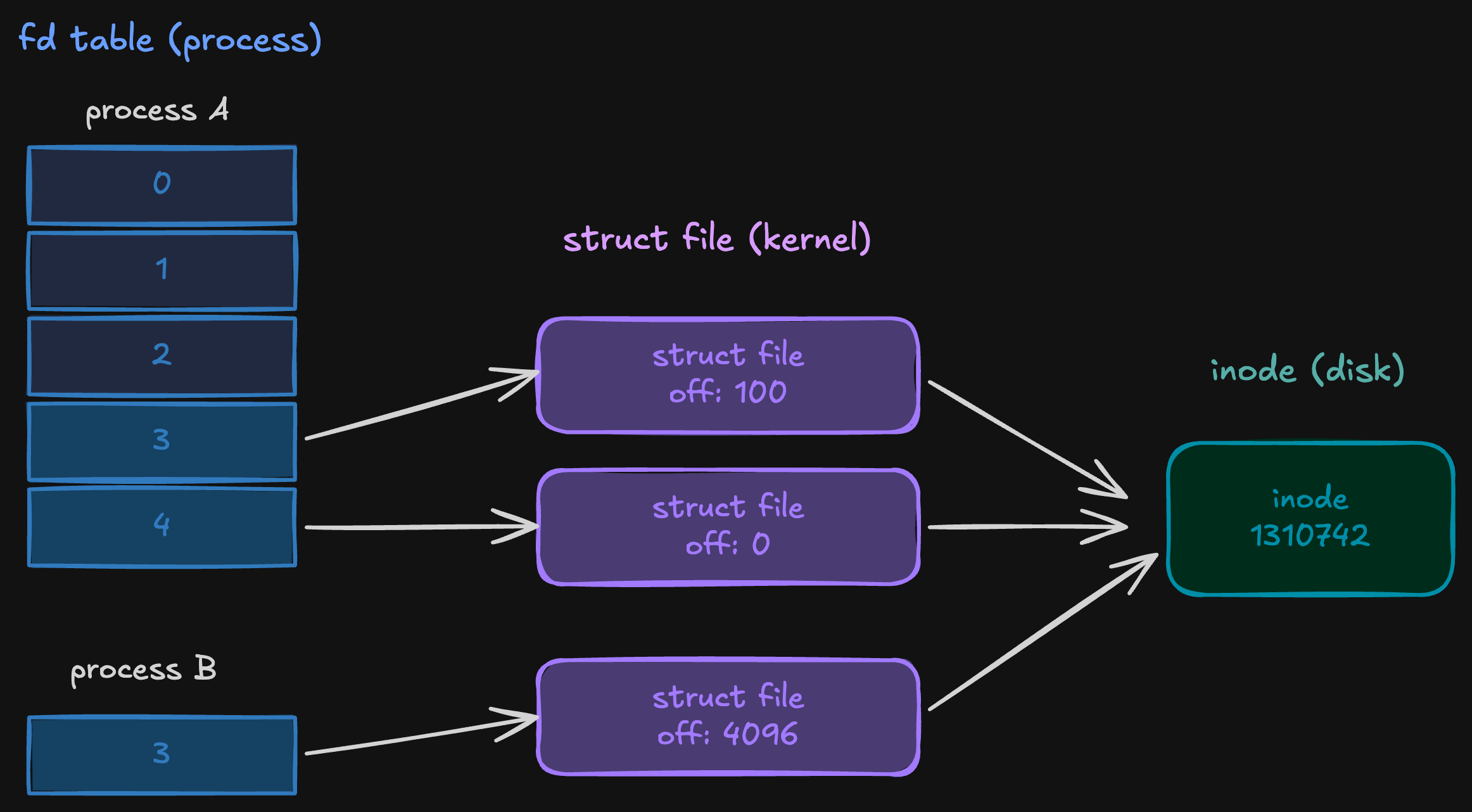
Process A opened the file twice and got two of them, each with its own offset. Process B opened it once and got a third. All three lead to the same inode.
Since the table only holds pointers, two entries can point to the same
struct file, dup does it within a process, fork across parent and
child. ref counts those entries, and close only frees the struct file when it reaches zero.
You can see the independent offsets in a few lines:
int a = open("main.c", O_RDONLY);
int b = open("main.c", O_RDONLY);

read(a, buf, 100);    // reads bytes 0 to 99, a's offset is now 100
read(b, buf, 100);    // reads bytes 0 to 99 again, b starts at 0
read(a, buf, 100);    // reads bytes 100 to 199
Reading through a doesn't touch b's offset at all.
Reading front to back is fine for cat. But say you need the bytes at
offset 5000, and only those. For that there's lseek:
lseek(fd, 5000, SEEK_SET);
read(fd, buf, 100);
lseek does no I/O at all. It just sets the offset, and the next read
starts from there. The third argument says what the offset is relative
to, as the man page puts it:
If whence is SEEK_SET, the offset is set to offset bytes.
If whence is SEEK_CUR, the offset is set to its current location
plus offset bytes.
If whence is SEEK_END, the offset is set to the size of the file
plus offset bytes.
This gets tricky with threads. Say you open a file once and hand the
same fd to several threads. Since threads share the fd table, they all
end up using the same struct file, and so the same off.
You could open a new fd per thread instead, and each would get its own offset. But every open is a new path lookup, which may land on a different file if it was replaced in between. Sharing one fd means everyone reads the same file, at the price of a shared offset.
And that price shows up when two threads each do a seek followed by a read. They can interleave like this:
thread A: lseek(fd, 5000, SEEK_SET)
thread B: lseek(fd, 9000, SEEK_SET)
thread A: read(fd, buf, 100)    // reads from 9000
thread B: read(fd, buf, 100)    // reads from 9100
Thread A ends up with bytes from offset 9000, and no error tells it so.
I hit exactly this while building an append only storage engine, with
several threads reading records at random offsets. The fix was pread:
pread(fd, buf, 100, 5000);It takes the offset as an argument and reads from there. Since it never touches the shared offset, threads can call it on the same fd without stepping on each other.
Reaching the disk
Remember the page cache from the reading section? write copies your
bytes into it, the same cache read copies from, and marks the page
dirty, which means it has changes the disk doesn't have yet. Since every process
shares that cache, anyone reading the file sees your changes right
away, before they reach the disk.
The kernel does this on purpose, and it's why these writes are called
buffered. Disks are slow, and many small writes are much cheaper as a
few big ones. So it holds dirty pages for a while, letting writes pile
up, and if you write to the same page twice, only the final version
ever goes to disk. Meanwhile write returns as soon as the copy is
done.
Those dirty pages get flushed eventually, for one of two reasons. Either they've been dirty for too long, around 30 seconds by default on Linux, or too much of memory is dirty and the kernel starts writing back to make room.
Most of the time that's exactly what you want. But if the machine loses
power before the flush, those bytes are gone, even though write told
you everything went fine.
For a database, that's unacceptable. When I was building my append only
storage engine, a record being acknowledged had to mean it was actually
on disk, and a successful write doesn't promise that. That's what
fsync is for:
write(fd, buf, n);
if (fsync(fd) < 0) {
    perror("fsync");
}
It blocks until all of the file's dirty pages are on disk, along with the inode's metadata, like its size.
There's a catch if the file is new. Its name isn't stored in the file,
it's an entry in the directory, and the directory is a file with its own
dirty pages. fsync on your file leaves those alone. So after a crash,
the data could be on disk with no name pointing to it. To avoid that,
open the directory and fsync it too.
Wrapping up
There's a lot I left out: hard and symbolic links, permissions, stat,
mmap, and plenty more. Most of what I covered here comes from OSTEP's
chapter on files and directories, and if you want to keep going, I
really recommend it. The rest of the book is just as good.