Networking concepts from the ground up
What is a Socket?
A socket is a way to speak to other programs using standard Unix file descriptors. Let's start with a famous catch: everything in Unix is a file.
The "everything is a file" idea comes down to one observation: every I/O operation is fundamentally about moving bytes from one place to another. Whether you're reading from a keyboard, writing to a screen, or reading a file off disk, the operation is structurally identical. That flow of bytes has a name: a stream. An ordered sequence of bytes moving between two endpoints, with no built-in separators. Just bytes from A to B.
For every kind of I/O in Unix, it uses a file descriptor. A file descriptor is simply an integer associated to an open file. These open files can be a network connection, a FIFO, a terminal, or obviously a disk file. They all use the same API: open(), read(), write(), close().
A socket is just another file descriptor, but instead of pointing at a file on disk, it points at a communication endpoint. Behind the hood, it is two kernel data structures layered on top of each other:
// include/linux/net.h
// The VFS layer — what the file descriptor actually points to.
struct socket {
    socket_state        state;    // connected, listening, etc.
    short               type;     // SOCK_STREAM, SOCK_DGRAM, etc.
    struct file         *file;    // back-pointer to the fd
    struct sock         *sk;      // pointer to the protocol layer below
    const struct proto_ops *ops;  // send, recv, bind, connect, etc.
};

// include/net/sock.h
// The protocol layer — where the actual data and state live.
struct sock {
    struct sock_common  __sk_common;       // family, addresses, port
    int                 sk_rcvbuf;         // receive buffer size
    int                 sk_sndbuf;         // send buffer size
    struct sk_buff_head sk_receive_queue;  // incoming packets
    struct sk_buff_head sk_write_queue;    // outgoing packets
    int                 sk_state;          // TCP_ESTABLISHED, TCP_LISTEN, etc.
    struct proto        *sk_prot;          // protocol impl (TCP, UDP...)
};
struct socket is the thin wrapper the kernel exposes through the file descriptor, it is what syscalls like send() and recv() operate on. struct sock is where the real work happens: the protocol family, addresses, and connection state, plus the two queues that do the actual data movement. The comments point to what each field is for. When you send() data, the kernel copies bytes from your userspace buffer into sk_write_queue, the network stack wraps them in headers and pushes them out. On the receiving end, incoming bytes land in sk_receive_queue and wait until you call recv().
The file descriptor you hold is just a handle. The real thing lives in kernel space.
To get a socket file descriptor you run the syscall socket(). You communicate through this socket using send() and recv(). Although you can still use read() and write() for sockets, send() and recv() offer greater control over the data being sent and received.
There are more than one group of sockets: Internet Sockets, Raw Sockets, Unix Sockets (for IPC), etc. The two types of Internet Sockets you'll be most in contact with are Stream sockets (SOCK_STREAM) and Datagram sockets (SOCK_DGRAM), sometimes called "connectionless sockets".
Don't worry if TCP, UDP, IP, or ports don't mean anything yet. We'll cover all of them in the sections below.
Stream Sockets
Stream sockets provide a reliable, two-way, connection-oriented communication stream. If you send data in the order "a, b", it will arrive in that same order, without errors or duplication.
If you have used telnet or ssh you have used stream sockets, because all your input needs to be delivered in the same order. If you're reading this in a browser, you're already using a stream socket. Web browsers use HTTP (Hypertext Transfer Protocol) which uses streams to get pages.
What ensures the reliability of stream sockets? It is reliable due a protocol called the Transmission Control Protocol, or TCP. TCP's job is to make sure those bytes actually arrive, in order, without loss or duplication. The stream itself is just bytes moving from A to B. TCP is what makes that journey reliable.
You might have seen TCP referred to as part of TCP/IP. That's because TCP doesn't work alone, it runs on top of IP (Internet Protocol). You'll read more about IP later.
Datagram Sockets
When using stream sockets with TCP you need to maintain an open connection between both sides, whereas with Datagram sockets you don't, and that's why they are called "connectionless".
Datagram sockets use a protocol called UDP (User Datagram Protocol). With this type of socket, you don't need a connection, you just build the packet and throw it at the receiver. It doesn't keep track if everything went right.
Have you ever heard of FTP (File Transfer Protocol)? Its simpler cousin, tftp, does the same thing but over UDP. But wait, how can you reliably transfer a file over an unreliable protocol? The answer is that tftp builds its own reliability on top of UDP: for every packet received, the receiver sends back a small "I got it" reply, called an ACK (acknowledgment). If the sender doesn't hear back in time, it throws the packet again.
The reason why such an unreliable protocol is used is, drumroll please... Speed! It is way faster to fire-and-forget than it is to track the connection. When you're implementing something that receives a ton of packets per second, it doesn't really matter if you lose one or two.
IP Addresses
Before we go further, let's define something we've been throwing around: a packet. When you send data over a network, it doesn't travel as one continuous stream. It gets chopped up into small chunks, each one wrapped with some header information about where it came from and where it's going. Each chunk is a packet. Keep this definition for now, we'll elaborate more later.
Ok, we have packets, sockets, TCP, UDP... but how does any of this know where to go?
An IP address is a unique identifier for a machine on a network. Just like a house has a postal address so letters can find it, every machine on the internet has an IP address so packets can find it.
IPv4
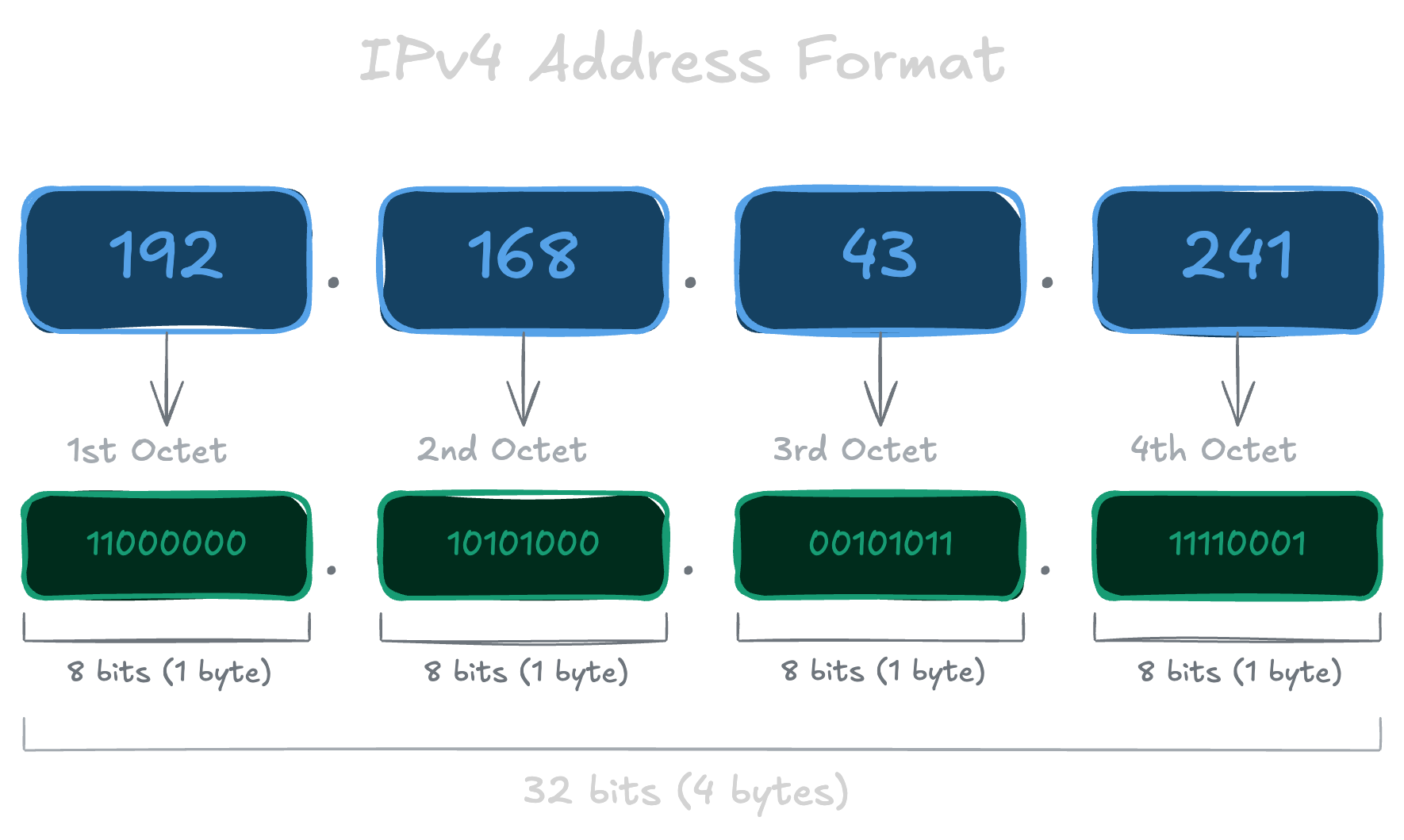
Until recently we only had IPv4, the classic format that looks like 192.168.1.1. Each of those four numbers is separated by a dot, goes from 0 to 255, which is a byte, so an IPv4 address is really just a 32-bit integer under the hood. That gives us about 4 billion possible addresses (2^32), which sounded like plenty at the time. It wasn't.
IPv6
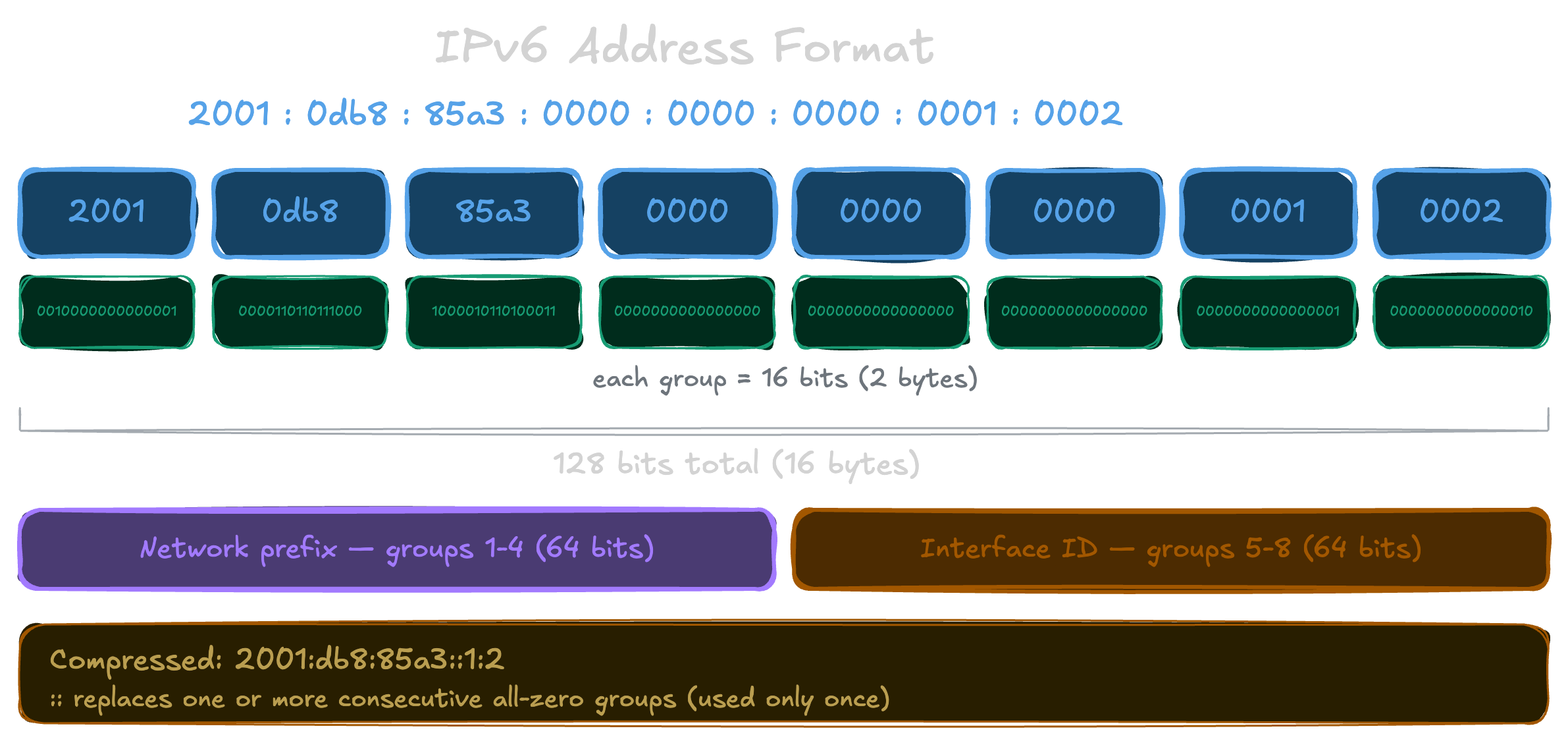
With the rapid and unpredicted expansion of the internet, someone realized that 4 billion addresses wouldn't be enough and came up with IPv6. Instead of 32 bits, IPv6 uses 128 bits, giving us 2^128 possible addresses. That's a number so astronomically large it won't run out in any foreseeable future.
It looks quite different from IPv4. Eight groups of four hexadecimal digits (remember that 2 hex digits = 1 byte), separated by colons:
2001:0db8:c9d2:0012:0000:0000:0000:0051
That's a lot to type. IPv6 allows you to compress it by dropping leading zeros and collapsing consecutive groups of zeros into :::
2001:db8:c9d2:12::51
Both represent the exact same address.
You'll also see this a lot:
::1
That's the loopback address, the equivalent of IPv4's 127.0.0.1. It means "this machine itself". If you ever see it, it means the traffic never left your computer.
Ports
An IP address gets a packet to the right machine, but your machine is running dozens of programs that all want to use the network. How does the OS know which packet belongs to which program? That's what ports are for.
A port is a 16-bit number, from 0 to 65535. When a packet arrives, the OS looks at three things to decide where to send it: the protocol (TCP or UDP), the destination IP, and the destination port. It then hands the packet to whichever program has a socket open on that combination.
This applies even locally: when you run a server on your own machine and open localhost:3000 in your browser, the 3000 is the port the OS uses to find the right program.
Ports exist on both sides of a connection. Servers listen on well-known ports so clients know where to connect. Clients also get a port, called an ephemeral port, automatically assigned by the OS for the duration of the connection so replies know where to come back to.
Some ports have well-known conventional mappings: port 80 for HTTP, port 22 for SSH, port 23 for telnet. Note that port 80 on TCP and port 80 on UDP are separate things. You can see the conventional mappings in /etc/services on any Unix machine, though it's just a reference, programs aren't forced to follow it.
Ports 0 to 1023 are privileged ports. On Unix, binding to them requires root. This is an OS-level convention, not a property of TCP/IP itself, so a privileged process can still take port 80, and a server will fail to start if something else already claimed it.
Byte Order
To complicate your life, CPU architectures don't all agree on the order bytes should be stored in memory. Take the two-byte hex number a1b2 as an example. Some machines store it as a1 followed by b2, the natural reading order. This is called Big-Endian. Others store it reversed, b2 followed by a1. This is called Little-Endian. There's a good chance you're on an Intel or AMD machine, which is Little-Endian. The internet agreed on Big-Endian as the standard, which is why it's also called Network Byte Order.
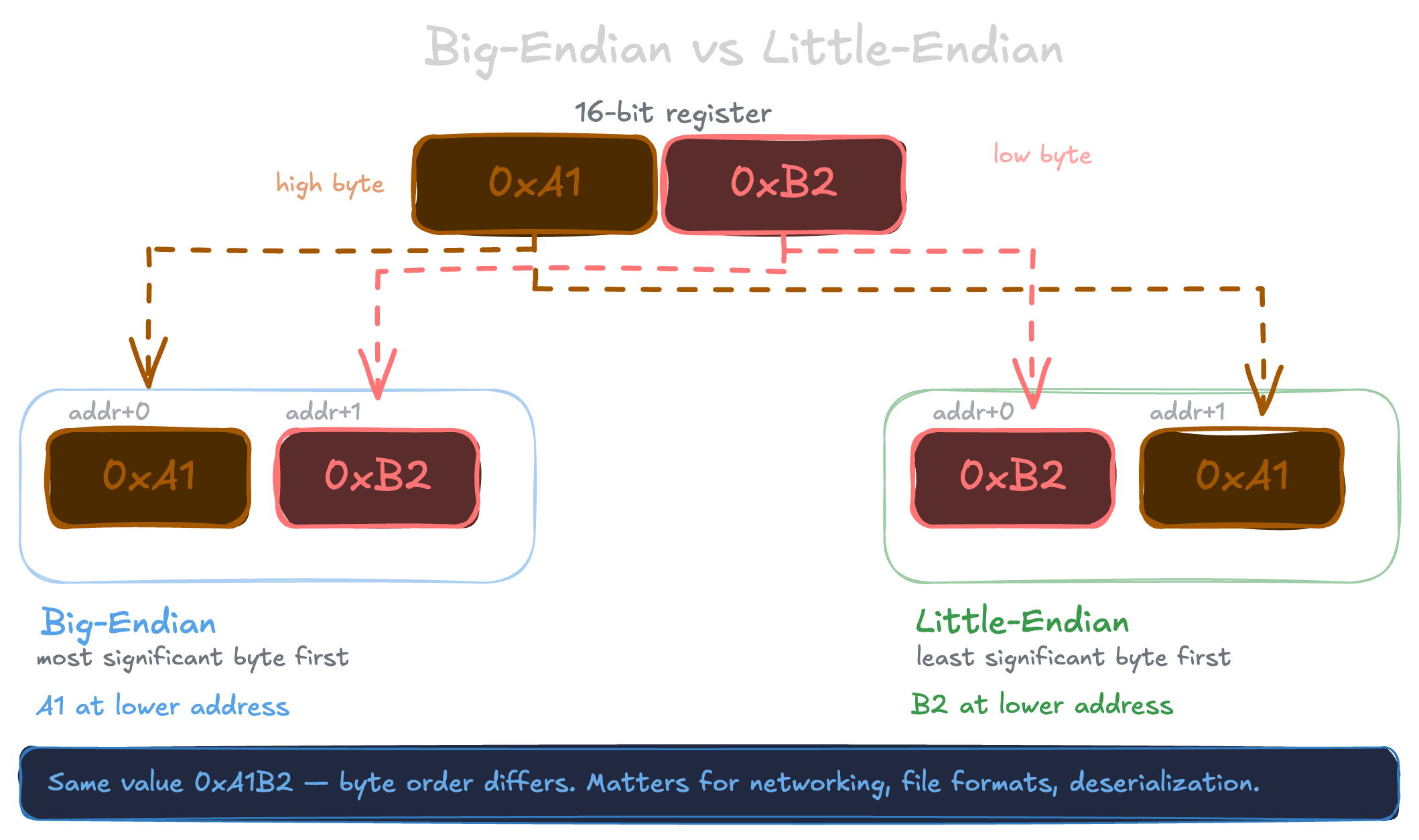
The reason this matters: when you send a number over the network, the bytes have to be in the right order or the other side will read them backwards and get a completely wrong value. Before sending, you convert to Network Byte Order. When receiving, you convert back to whatever your machine uses.
The C standard library gives you four functions for this:
htons() // host to network short (2 bytes)
htonl() // host to network long (4 bytes)
ntohs() // network to host short (2 bytes)
ntohl() // network to host long (4 bytes)
You'll use these when filling out socket structs. As for why different hardware stores bytes in different orders in the first place, I'll spare you that rabbit hole. You're probably bored enough already.
DNS
We said IP addresses are how machines find each other. But when you type google.com in your browser, you're not typing an IP address. So how does your machine know where to go? Someone has to translate that name into an IP. But who keeps track of all of this? Is there a giant notebook somewhere mapping every domain name to an IP address?
Not quite. The internet only understands IP addresses, but humans only remember names, so DNS (Domain Name System) exists as the bridge between the two. Every time you ping google.com, ssh user@myserver.com, or open a website, something is resolving that name to an IP before a single packet is sent. That translation involves a chain of requests bouncing between servers around the world, but from your perspective it just happens, invisibly, in milliseconds.
A common misconception is that DNS is a browser thing. That resolution happens at the OS level. The browser just asks the OS "what's the IP for this name?" and the OS handles the rest. ping, curl, ssh, any program that uses a hostname goes through the same process without knowing or caring how it works.
For that to work, your computer needs to know which DNS server to ask. That's just a setting, an IP address pointing to a resolver. By default your router hands you this automatically, usually pointing to your ISP's (Internet Service Provider, the company that provides your internet connection) DNS servers. But you can override it and point to any resolver you want, like 8.8.8.8 (Google) or 1.1.1.1 (Cloudflare).
You can also bypass DNS entirely for specific names by editing /etc/hosts on your own machine. Before asking any DNS server, your OS checks that file first. That's how localhost resolves to 127.0.0.1 without any network request involved.
No more yapping
Well, if you've reached here (without scrolling all the way 🧐), that was a lot of theory. You now have the basic vocabulary of networking. I plan to write a follow-up going deeper into TCP and UDP, the network layers they sit on, and actual code to make all of it concrete.