After all, what is a .tar.gz file?
If you use Linux, you have downloaded a .tar.gz file. For most of my time using Linux I assumed the format was a Linux thing, the same way .exe feels like a Windows thing or .dmg feels like a Mac thing. You see it everywhere on Linux, so you just assume it is what it is and that's it.
I was studying git, trying to understand how it stores objects internally, and somewhere along the way I ran into the fact that before git existed, the way people shared code was by packaging the source into a .tar.gz and putting it on a server for other people to download. That had been the standard way Unix software got distributed for decades before GitHub or anything like it.
tar was made for tape
tar is short for tape archive, and the name is literal. It was written in 1979, on early Unix, to take files from a filesystem and lay them out as a single flat stream that could be written onto a magnetic tape and read back later.
Networking was rare and slow, and disks were small and expensive. If you needed to back something up or move it to another machine, the usual option was to write it onto a reel of magnetic tape and physically carry the tape over. Tar was the tool that turned a directory into something a tape drive could write.
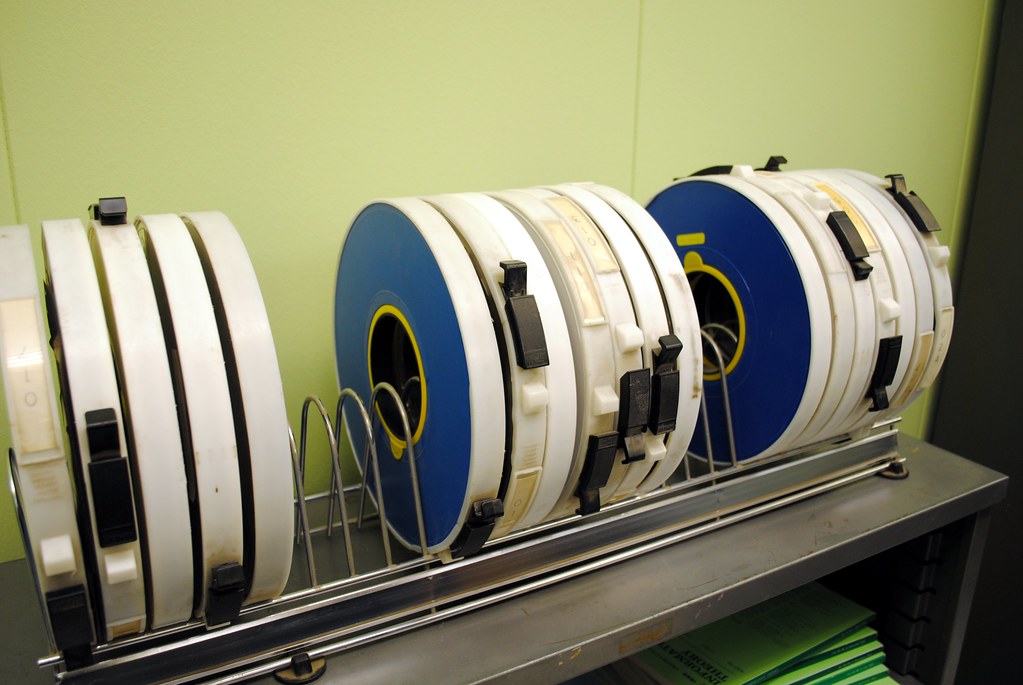
A lot of the format makes more sense once you know it was aimed at tape:
- No index or table of contents. Tape is linear: you can only read forward, you can't seek. An index would be pointless because you'd have to read past the data to use it. So tar just alternates metadata with content: header, file, header, file, all the way through.
- 512-byte blocks. Tape drives wrote in fixed-size blocks, and 512 bytes was the standard. Tar's headers are exactly 512 bytes and file contents are padded to the next 512-byte boundary.
- No compression. Many tape drives had hardware compression built in, so compressing in software first would have been redundant or counterproductive. Tar was designed to hand over raw bytes and let the drive worry about it.
From tape to dial-up
By the late 80s and through the 90s, the more common reason to encounter a .tar file was downloading software over the internet, and that brought a new constraint: bandwidth.
A 56k modem gave you about 5 kilobytes per second of real-world throughput. A one-megabyte download took a few minutes, a ten-megabyte one was something you started before going to do something else. Compression made a real, visible difference, and Unix software started getting distributed as tar archives passed through a compressor on the way out the door.
The first common combination was .tar.Z, which was tar piped through a program called compress. When gzip was released in 1992 as a free, patent-free replacement, .tar.gz quickly took over and became the default shape of "downloadable Unix source code" for the next couple of decades.
Two programs, not one
tar and gzip are not one tool. They are two completely separate programs, written years apart, that get used together so often we write the two extensions back to back and treat the combination as if it were a single format.
tar is an archiver. It takes files and directories and packs them into a single file, preserving Unix metadata like permissions, ownership, timestamps, and symlink targets. It doesn't compress anything. A .tar file is usually a little larger than the sum of its inputs because tar adds a 512-byte header in front of every file.
gzip is a compressor. It takes a single file and makes it smaller using an algorithm called DEFLATE (the same one used inside zip and PNG). It only works on one file at a time, and it doesn't know anything about directories at all. If you run gzip mydir/ on a directory, it refuses and exits. If you run gzip report.txt, it replaces the file with report.txt.gz. That's the whole tool. This is exactly why pairing it with tar works so well: tar first flattens a whole directory into a single file, and then gzip has something it can actually compress.
So .tar.gz describes, in order, what happened to the data: bundled with tar, then compressed with gzip. .tar.bz2 is tar plus bzip2. .tar.xz is tar plus xz. .tar.zst is tar plus zstd. Same bundling step, different compressor.

This is also why you basically never see .tar.gz on Windows, where .zip is the default. Zip came out of DOS in 1989, a few years before gzip even existed, and made the opposite design choice: bundling and compression are combined into a single format, handled by a single tool. That fits Windows, where the OS hides the shell and "right-click, extract" needs to just work. Unix went the other way because the whole point of Unix was that small composable tools beat one big format.
You can write the Unix pipeline out by hand:
tar -cf - mydir/ | gzip > mydir.tar.gzThe - tells tar to write to stdout instead of a file. Gzip reads from stdin, compresses what it gets, and the shell redirects the result into mydir.tar.gz. Tar doesn't know gzip exists, gzip doesn't know tar exists, and they only meet inside the pipe.
The benefit of this design is that you can swap the compressor without touching the archiver. When bzip2 came along and compressed better than gzip, nothing about tar had to change. Same with xz and zstd. The archive format stayed the same across decades of new compressors.
The z in tar -xzvf (the other letters do unrelated things, which I'll get to in a bit) is a later convenience: at some point tar gained flags for calling the compressor on your behalf. z for gzip, j for bzip2, J for xz. Tar is still shelling out to a separate program, the flag just hides the pipe.
You still see .tar.gz pretty commonly. GitHub generates one on the fly when you click "Source code (tar.gz)" on a release page, every Docker image layer is a compressed tar archive, npm packages are .tgz, Python source distributions are .tar.gz. And gzip on its own (without tar) is even more everywhere. HTTP servers compress responses before sending them, and gzip is one of the options they can use, alongside others like brotli or zstd. This page actually got to your browser compressed with the same gzip from the same 1992 program. No tar in that case, because there's only one file in flight, just the compression half of .tar.gz doing its job on its own.
So, after all, what is a .tar.gz?
After all this context, the answer is a lot less mysterious. A .tar.gz is a tar archive (a directory flattened into a single stream, in a format originally shaped by magnetic tape) that has then been passed through gzip and compressed with an algorithm called DEFLATE. The format exists in two parts because Unix split bundling and compression into separate tools, so the compressor could be swapped out independently of the archiver.
Appendix: what the flags in tar -xzvf actually mean
I learned tar -xzvf as a single chunk long before I ever read the flags:
xmeans extract. The other common one iscfor create, which you'd use to make an archive instead of unpacking one.zmeans run it through gzip. For.tar.bz2you'd usej, for.tar.xzyou'd useJ.vmeans verbose, so tar prints the name of each file as it processes it. Purely cosmetic, you can drop it.fmeans the next argument is the filename. Withoutf, tar would try to read from or write to a tape device, which is another sign of where the tool came from. The default destination really is a tape drive.
So tar -xzvf something.tar.gz reads as: extract, decompress with gzip, be verbose, the file is something.tar.gz.